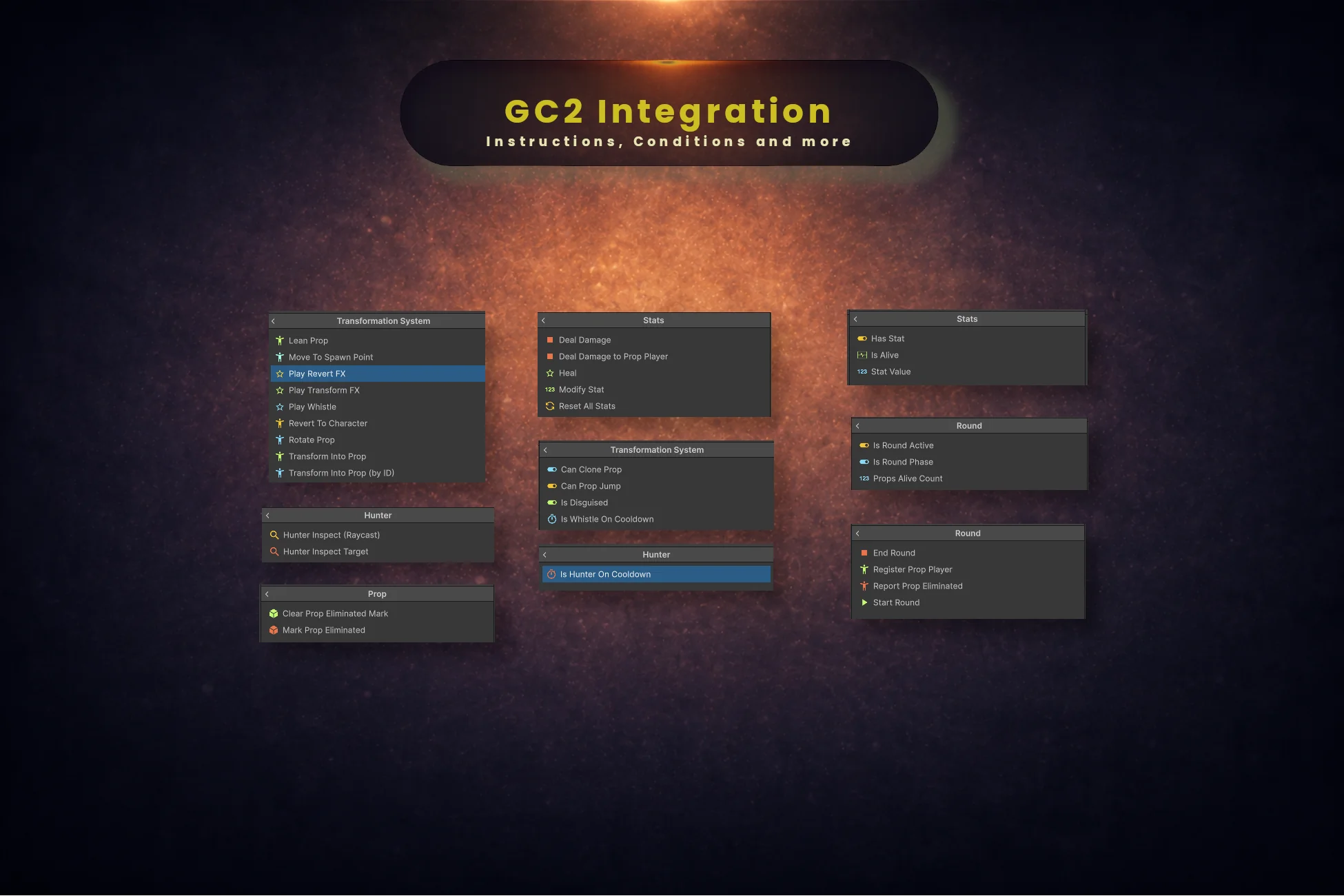
Transformation System/… in the Game Creator picker, grouped into Hunter, Round, Stats, Input and the top-level prop actions. If a node does not show up, search its title rather than browsing the tree.22
Instructions
12
Conditions
13
Events
15
Property Getters
[Version] against the graphs saved in your project, so it moves independently of the package version. Renames from 1.0.0 onward carry [MovedFrom], so your graphs survive them.Instructions (22)
Prop
| Node | Menu path | Ver. | What it does |
|---|---|---|---|
| Transform Into Prop | Transformation System/Transform Into Prop | 1.0.0 | Disguises the target as the prop they are currently looking at. Requires a Prop Highlight component on the target (or its children) with a valid clonable target. |
| Transform Into Prop (by ID) | Transformation System/Transform Into Prop (by ID) | 1.0.0 | Looks a prop up by its ID in the registry and disguises the target. The ID is the save- and network-safe handle. |
| Revert To Character | Transformation System/Revert To Character | 1.0.0 | Removes the disguise and restores the target character’s original appearance. |
| Mark Prop Eliminated | Transformation System/Prop/Mark Prop Eliminated | 1.0.0 | Gives a disguise a distinct look so everyone can see that player is out. Wire it to On Vital Depleted. Supply a material to lay over the prop, or leave it empty to tint it instead. |
| Clear Prop Eliminated Mark | Transformation System/Prop/Clear Prop Eliminated Mark | 1.0.0 | Puts a marked disguise back to its authored materials. Only needed when a player is revived while still disguised — reverting clears the mark by itself. |
Prop Motion
| Node | Menu path | Ver. | What it does |
|---|---|---|---|
| Lean Prop | Transformation System/Lean Prop | 1.0.0 | Increments the target’s Prop Clone Motion lean by the given delta. Fire once per key press; the opposite direction returns the prop to upright. Each axis clamps to −1…1. |
| Rotate Prop | Transformation System/Rotate Prop | 1.0.0 | Adds a rotation step to the target’s Prop Clone Motion, spinning the clone around its Y axis. Positive is clockwise. Fire once per key press. |
FX
| Node | Menu path | Ver. | What it does |
|---|---|---|---|
| Play Transform FX | Transformation System/Play Transform FX | 1.0.0 | Manually triggers the transform particle and sound FX on the target. Useful in custom sequences. |
| Play Revert FX | Transformation System/Play Revert FX | 1.0.0 | Manually triggers the revert particle and sound FX on the target. |
| Play Whistle | Transformation System/Play Whistle | 1.0.0 | Triggers the prop whistle sound and its cooldown. Does nothing while on cooldown. Gate it with Is Disguised and Is Whistle On Cooldown. |
Spawning
| Node | Menu path | Ver. | What it does |
|---|---|---|---|
| Move To Spawn Point | Transformation System/Move To Spawn Point | 1.0.0 | Teleports the target to the active spawn point for the chosen role. Wire it to On Round State Changed with an Is Round Phase = Hunt condition — not to On Update, which re-teleports every frame of the phase. |
Hunter
| Node | Menu path | Ver. | What it does |
|---|---|---|---|
| Hunter Inspect (Raycast) | Transformation System/Hunter/Hunter Inspect (Raycast) | 1.0.0 | Fires the hunter’s inspect raycast from the ray origin. This is the key-press setup: place it on the hunter’s own trigger. |
| Hunter Inspect Target | Transformation System/Hunter/Hunter Inspect Target | 1.0.0 | Evaluates a specific hit object as an inspect — no raycast. Place it on the struck object’s trigger (e.g. On Melee Hit), with Hunter set to the attacker and Inspected set to Self. |
Round
| Node | Menu path | Ver. | What it does |
|---|---|---|---|
| Start Round | Transformation System/Round/Start Round | 2.0.0 | Moves the round from Waiting to Prep Phase and starts the countdown. Leave Settings empty to use the Round System’s own; assign a different Round Settings asset to shape this round only. |
| End Round | Transformation System/Round/End Round | 1.0.0 | Forces the round to end immediately, regardless of remaining time or props alive. |
| Register Prop Player | Transformation System/Round/Register Prop Player | 1.1.0 | Adds a character to the round’s roster so it counts towards Props Alive. Run it once per hider before Start Round — typically from a trigger on the hider itself, with Hider left on Self. |
| Report Prop Eliminated | Transformation System/Round/Report Prop Eliminated | 1.1.0 | Tells the round a hider is out, decrementing Props Alive. Run it from that hider’s own On Vital Depleted with Eliminated left on Self. Unregistered characters are ignored. |
Stats
| Node | Menu path | Ver. | What it does |
|---|---|---|---|
| Deal Damage | Transformation System/Stats/Deal Damage | 1.0.0 | Subtracts an amount from a vital stat (typically Health). When the stat is depleted, the Prop Stat Sheet fires On Vital Depleted. |
| Deal Damage to Prop Player | Transformation System/Stats/Deal Damage to Prop Player | 1.0.0 | Routes damage to whoever is disguised as a struck world prop, or applies it directly when placed on a character trigger. Use this path wherever GC2 Melee physically hits a collider. |
| Heal | Transformation System/Stats/Heal | 1.0.0 | Adds an amount to a health stat, never exceeding its current maximum. |
| Modify Stat | Transformation System/Stats/Modify Stat | 1.0.0 | Adds, subtracts, sets, or adjusts the maximum of a stat on the target’s Prop Stat Sheet. Negative amounts with Add deal damage. |
| Reset All Stats | Transformation System/Stats/Reset All Stats | 1.0.0 | Resets every stat on the target’s Prop Stat Sheet to its base value and restores Is Alive. Call it at the start of each round. |
Conditions (12)
Prop
| Node | Menu path | Ver. | What it does |
|---|---|---|---|
| Is Disguised | Transformation System/Is Disguised | 1.0.0 | True when the target character is currently in a prop disguise. |
| Can Clone Prop | Transformation System/Can Clone Prop | 1.0.0 | True when the prop the target is looking at has Allow Cloning enabled. |
| Can Prop Jump | Transformation System/Can Prop Jump | 1.0.0 | True when the active movement profile permits jumping, or when the character is not disguised at all. |
| Is Whistle On Cooldown | Transformation System/Is Whistle On Cooldown | 1.0.0 | True while the prop whistle cannot be triggered again yet. |
Hunter
| Node | Menu path | Ver. | What it does |
|---|---|---|---|
| Is Hunter On Cooldown | Transformation System/Hunter/Is Hunter On Cooldown | 1.0.0 | True while the hunter’s inspect ability is on cooldown. |
Input
| Node | Menu path | Ver. | What it does |
|---|---|---|---|
| Is Pointer Over UI | Transformation System/Input/Is Pointer Over UI | 1.0.0 | True when the pointer is over an interface element, so a click on a button is not also a swing at the world behind it. Add it with the value set to false. On Cursor Click already does this; On Input Button does not. |
Round
| Node | Menu path | Ver. | What it does |
|---|---|---|---|
| Is Round Active | Transformation System/Round/Is Round Active | 1.0.0 | True while the round is in Prep Phase or Hunt Phase. |
| Is Round Phase | Transformation System/Round/Is Round Phase | 1.0.0 | True when the round is in the selected phase. Use it to gate actions per phase — for example allowing hunter damage only during Hunt. |
| Props Alive Count | Transformation System/Round/Props Alive Count | 1.0.0 | Compares the number of prop players still alive in the current round. |
Stats
| Node | Menu path | Ver. | What it does |
|---|---|---|---|
| Is Alive | Transformation System/Stats/Is Alive | 1.0.0 | True while the target’s Prop Stat Sheet still carries its Is Alive flag. Becomes false when any vital stat is depleted to its hard minimum. |
| Has Stat | Transformation System/Stats/Has Stat | 1.0.0 | True when the target’s Prop Stat Sheet has an entry for the specified Prop Stat Type. |
| Stat Value | Transformation System/Stats/Stat Value | 1.0.0 | Compares the current, maximum, or ratio value of a stat on the target’s Prop Stat Sheet. |
Events (13)
Prop
| Node | Menu path | Ver. | What it does |
|---|---|---|---|
| On Transform Complete | Transformation System/On Transform Complete | 1.0.0 | Fires when a character finishes transforming into a prop disguise. |
| On Reverted | Transformation System/On Reverted | 1.0.0 | Fires when a character reverts from a disguise back to their original form. |
| On Whistle | Transformation System/On Whistle | 1.0.0 | Fires when a prop player emits a whistle. Useful for hunter direction indicators or AI reactions. |
Hunter
| Node | Menu path | Ver. | What it does |
|---|---|---|---|
| On Correct Guess | Transformation System/Hunter/On Correct Guess | 1.0.0 | Fires on the hunter when they correctly identify a disguised prop player. |
| On Wrong Guess | Transformation System/Hunter/On Wrong Guess | 1.0.0 | Fires on the hunter when they incorrectly guess a real, non-player prop. |
| On Was Found | Transformation System/Hunter/On Was Found | 1.0.0 | Fires on THIS prop player when a hunter identifies them. Place it on the prop player, wire Deal Damage with Target = Self, and no hunter-side routing is needed. It fires only for that specific prop. |
| On Hunter Hears Whistle | Transformation System/Hunter/On Hunter Hears Whistle | 1.0.0 | Fires on the hunter when any prop player whistles within the whistle’s configured range. Place the trigger on the hunter. |
Round
| Node | Menu path | Ver. | What it does |
|---|---|---|---|
| On Round State Changed | Transformation System/Round/On Round State Changed | 1.0.0 | Fires whenever the round moves between Waiting, Prep Phase, Hunt Phase and Round End. |
| On Prop Eliminated | Transformation System/Round/On Prop Eliminated | 1.0.0 | Fires when a prop player is eliminated. |
| On Hunters Win | Transformation System/Round/On Hunters Win | 1.0.0 | Fires when every prop player has been eliminated. |
| On Props Win | Transformation System/Round/On Props Win | 1.0.0 | Fires when the hunt timer expires with at least one prop player still alive. |
Stats
| Node | Menu path | Ver. | What it does |
|---|---|---|---|
| On Stat Changed | Transformation System/Stats/On Stat Changed | 1.0.0 | Fires whenever any stat’s current value changes. Use it to refresh health bars or play hit reactions. |
| On Vital Depleted | Transformation System/Stats/On Vital Depleted | 1.0.0 | Fires when any vital stat reaches its hard minimum. Use it for death animations, respawn timers, or reporting an elimination. |
Property Getters (15)
These drop into the dropdown of any string or decimal field — a Text label, a variable, a dialogue line, a condition's comparison value. Timers, counts and cooldowns are getters precisely so a HUD needs no code and no arithmetic in the graph.
Prop
| Node | Menu path | Ver. | What it does |
|---|---|---|---|
| Current Prop Name | Transformation System/Prop/Current Prop Name | 1.0.0 | The display name of the prop the target is disguised as, or an empty string. Safe for dialogue and HUD labels — it reads the Prop Definition, not the GameObject. |
| Current Prop ID | Transformation System/Prop/Current Prop ID | 1.0.0 | The stable identifier of the prop the target is disguised as. This is the network- and save-safe key. |
| Prop ID | Transformation System/Prop ID | 1.0.0 | The ID of a Prop Definition asset, chosen by dragging the asset in instead of typing its GUID. |
| Prop Size | Transformation System/Prop Size | 1.0.0 | A measured dimension of the current disguise (height, width, depth, footprint or bounding radius) in world units, or 0 when not disguised. Feed it into Change Aim so a crate and a tree frame differently. |
| Whistle Cooldown | Transformation System/Whistle/Whistle Cooldown | 1.0.0 | The whistle cooldown as a 0–1 fraction: 1 just after whistling, 0 when ready. Drive a UI fill from it without writing a script. |
| Whistle Range | Transformation System/Whistle/Whistle Range | 1.0.0 | The configured whistle range in world units — the same range that decides which hunters hear it. |
Hunter
| Node | Menu path | Ver. | What it does |
|---|---|---|---|
| Hunter Cooldown | Transformation System/Hunter/Hunter Cooldown | 1.0.0 | Seconds until the target hunter may inspect again, or 0 when ready. Use it for a wrong-guess penalty countdown. |
| Hunter Setting | Transformation System/Hunter Setting | 2.0.0 | Reads a value from a shared Hunter Settings asset — the inspect range, or the cooldown between attempts. Pair Inspect Cooldown with Hunter Cooldown to drive a cooldown bar without typing the duration into the HUD. |
Round
| Node | Menu path | Ver. | What it does |
|---|---|---|---|
| Round State | Transformation System/Round/Round State | 1.0.0 | The current phase as readable text: Waiting, Prep Phase, Hunt Phase or Round End. For branching use the Is Round Phase condition instead — this text is for display. |
| Round Timer | Transformation System/Round/Round Timer | 1.0.0 | Seconds remaining in the current phase. Use it to drive a countdown bar or compare against a threshold. |
| Round Timer (mm:ss) | Transformation System/Round/Round Timer (mm-ss) | 1.0.0 | The round timer formatted as mm:ss while counting, and a placeholder (--:-- by default) when it is not. Bind it to a label and the clock is done. |
| Round Number | Transformation System/Round/Round Number | 1.0.0 | How many rounds have started in this session; the first round is 1. Returns 0 before the first round. |
| Props Alive | Transformation System/Round/Props Alive | 1.0.0 | How many registered prop players are still alive. Pair it with Props Registered for an "x of y remaining" display. |
| Props Registered | Transformation System/Round/Props Registered | 1.0.0 | How many prop players joined the current round, counting eliminated ones — the "y" in "x of y remaining". |
Stats
| Node | Menu path | Ver. | What it does |
|---|---|---|---|
| Stat Value | Transformation System/Stats/Stat Value | 1.0.0 | A stat’s current value, maximum, or 0–1 ratio from the target’s Prop Stat Sheet. Feed the ratio straight into a health bar’s fill. |
Choosing a Node's Target
Every node that acts on a character has a target field, and it defaults to Self — the object the Trigger sits on, or any parent of it. That is what you want whenever the Trigger belongs to the character being acted on, including a Trigger on a child object such as a Reactions group.
Common Patterns
Transform and revert on one key
Two triggers on the same key, separated by the Is Disguised condition. Switching directly from one prop to another needs no revert first.
On Key Down (E)  +  Can Clone Prop = true   ->  Transform Into Prop     (Self)
On Key Down (E)  +  Is Disguised   = true   ->  Revert To Character     (Self)
Stop a UI click from also being an attack
Game Creator's On Cursor Click already refuses to fire over UI. On Input Button — the normal way to bind an input action — does not.
On Input Button (attack)  +  Is Pointer Over UI = false
-> Hunter Inspect (Raycast) Hunter: SelfImage, so a full-screen crosshair or HUD panel blocks every attack — which looks exactly like a broken attack button. Untick Raycast Target on anything decorative.Damage on the prop side
Because On Was Found fires on the prop player themselves, no hunter-side routing is needed — and the same wiring is correct in multiplayer.
On Was Found     ->  Deal Damage   Target = Self   Amount = <your number>   (hider prefab)
On Wrong Guess   ->  Deal Damage   Target = Self   Amount = <your number>   (hunter prefab)
Report an elimination from the hider's own death
On Vital Depleted  (Target = Self)
  ->  Mark Prop Eliminated      Target = Self
  ->  Report Prop Eliminated    Eliminated = Self
Gate damage to the hunt phase
So props cannot be eliminated while they are still choosing a disguise.
On Was Found + Is Round Phase = Hunt -> Deal Damage Target = SelfLean on a key press, not on update
Lean Prop accumulates and clamps each axis to −1…1, so the opposite key brings the prop back upright. Driving it from On Update would reach full tilt within a few frames and stay there — use PropCloneMotion.SetLeanInput(Vector2) from your own script for a smooth analogue lean instead.
On Key Down (Q)  +  Is Disguised = true  ->  Lean Prop   Self   Lean X: -1
On Key Down (E)  +  Is Disguised = true  ->  Lean Prop   Self   Lean X: +1
A cooldown bar with no numbers typed twice
Pair the Hunter Setting → Inspect Cooldown getter with the Hunter Cooldown getter and the HUD never holds its own copy of the duration.