On the Prop Player (Hider)
One required component and a shelf of optional ones. A hider needs a Collider on the root — a Capsule Collider, or the Character Controller a Game Creator character already has — and at least one renderer somewhere in its hierarchy. No Rigidbody is required, and none is added.
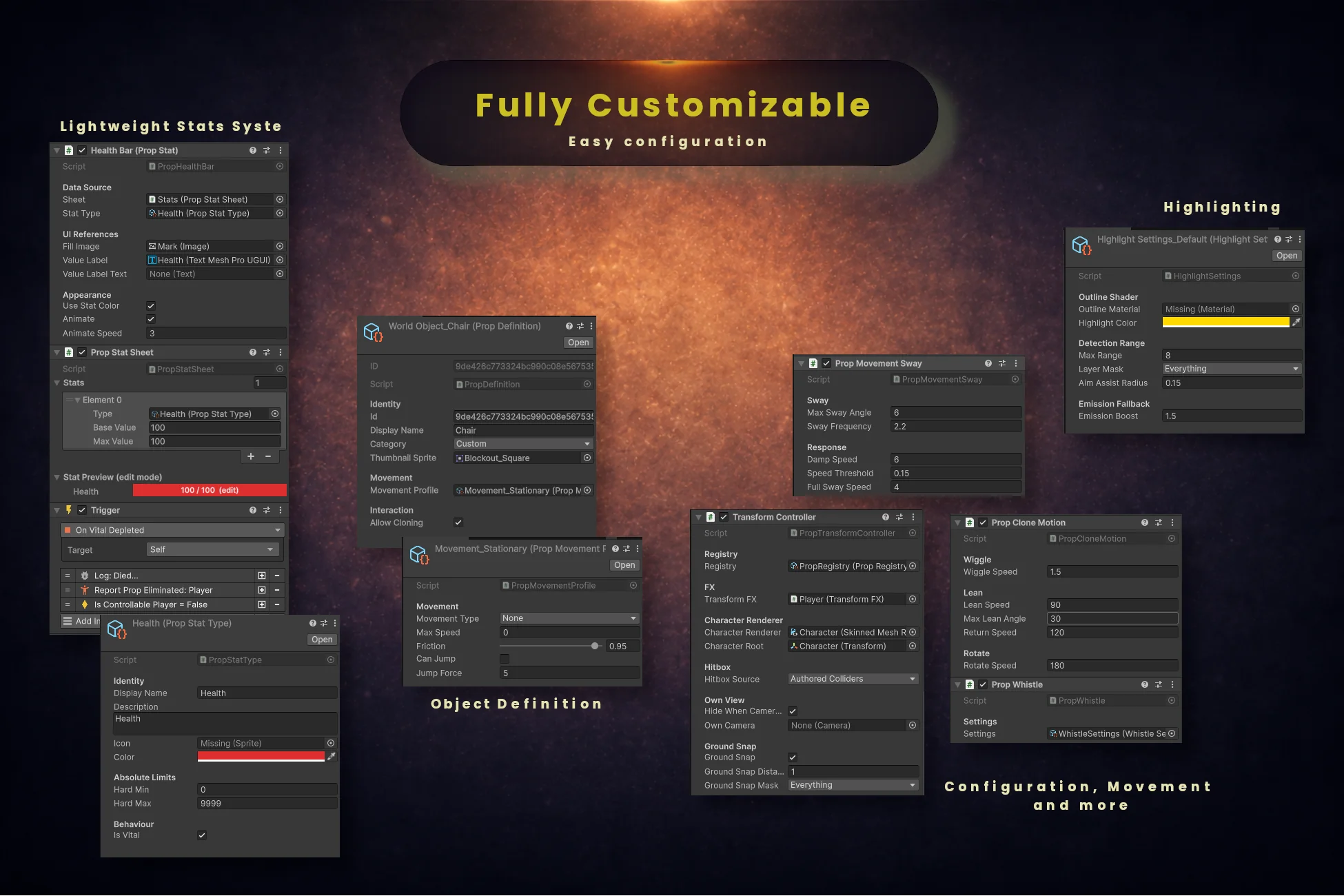
Transform Controller
Required · HiderThe disguise itself. Clones the world prop onto the character, hides the character's renderers, builds the solid detection hitbox, and restores everything on revert. Class name: PropTransformController.
Create via:
Add Component → Transformation System → Transform ControllerProperties
| Property | Type | Description |
|---|---|---|
| Registry | PropRegistry | The registry this controller pulls definitions from — needed for lookups by ID |
| FX | TransformFX | Optional. When assigned, FX plays automatically on transform and revert |
| Character Renderer | Renderer | Leave blank to hide every renderer under this character. Assign one only to deliberately narrow that to a single renderer |
| Character Root | Transform | Optional override for which transform the disguise is parented to |
| Hitbox Source | enum | Authored Colliders (default) reproduces the prop's own shapes; Computed Box wraps everything the prop renders |
| Hide When Camera Inside | bool | Hides the clone from your own camera when it is inside the disguise, so you can see out |
| Own Camera | Camera | Camera to test for the above. Empty uses Camera.main |
| Ground Snap | bool | On by default. Plants the disguise on the surface under the player rather than on the character's foot level |
| Ground Snap Distance | float | How far above and below the foot level to search for ground, in metres (default 1) |
| Ground Snap Mask | LayerMask | Which layers count as ground for the snap query |
Methods
TransformInto(PropWorldObject prop)   // full visual transform from a scene object
TransformInto(PropDefinition prop)    // state only — no clone, for peers that build their own visuals
TransformIntoById(string id)          // registry lookup, then the full visual transform
Revert()

// Readable state
bool IsDisguised · bool HasVisibleDisguise · bool IsMarkedEliminated
PropDefinition CurrentProp · PropWorldObject CurrentWorldProp
GameObject PropClone · Transform PropPivot · Bounds PropBounds

// Events (plus static OnAny… variants for listeners with no reference)
OnTransformBegin · OnTransformComplete · OnRevert · OnWasFound
Prop Highlight
Optional · HiderMarks the prop under the crosshair as something you can become, and answers the Can Clone Prop condition. This is hider equipment: a hunter has nothing to aim into. A disguised player highlights exactly like the prop they imitate, so an absent highlight never gives a player away.
Create via:
Add Component → Transformation System → Prop HighlightProperties
| Property | Type | Description |
|---|---|---|
| Settings | HighlightSettings | Supplies the outline material, colour, range, layer mask and aim assist radius |
| Ray Origin | Transform | Where the detection ray starts. Unassigned resolves to the main camera, then to this transform |
Transform FX
Optional · HiderPlays particles and sound when the character transforms or reverts. Assign it to the Transform Controller's FX slot to have it fire automatically, or trigger it from the Play Transform FX / Play Revert FX instructions.
Create via:
Add Component → Transformation System → Transform FXProperties
| Property | Type | Description |
|---|---|---|
| Profile | TransformFXProfile | The particle prefabs, sounds, screen flash and volume |
| Audio Source | AudioSource | Optional. One is used or added on the same GameObject |
Methods
PlayTransform()
PlayRevert()
SetProfile(TransformFXProfile profile)
Prop Clone Motion
Optional · HiderCosmetic motion on the disguise clone: a wiggle while moving, a player-driven lean, and a Y-axis rotation. Purely visual — it never affects physics, and everything resets automatically on revert.
Create via:
Add Component → Transformation System → Prop Clone MotionProperties
| Property | Type | Description |
|---|---|---|
| Wiggle Speed | float | How fast the clone wiggles while the character is moving (default 1.5) |
| Lean Speed | float | Degrees per second toward the target lean angle (default 90) |
| Max Lean Angle | float | Maximum tilt in degrees at full input (default 30) |
| Return Speed | float | Degrees per second back to upright when input is released (default 120) |
| Rotate Speed | float | Degrees per second toward the target rotation (default 180) |
Methods
SetLeanInput(Vector2 input)   // sets — for a smooth analogue lean from a stick or mouse axis
AddLeanInput(Vector2 delta)   // accumulates, clamped to −1…1 per axis — what Lean Prop uses
AddRotation(float degrees)
Prop Whistle
Optional · HiderEmits a positional sound on a cooldown as a deception tool — luring a hunter away, signalling teammates, or bluffing as ambient prop noise. Requires an AudioSource, which is added automatically.
Create via:
Add Component → Transformation System → Prop WhistleProperties
| Property | Type | Description |
|---|---|---|
| Settings | WhistleSettings | The clip, the cooldown duration and the range hunters hear it within |
Methods
Whistle()

bool IsOnCooldown · float CooldownFraction (0–1) · float WhistleRange
event Action<Vector3> OnWhistle   // the world position of the whistle
Prop Movement Sway
Optional · HiderA speed-driven sway on the disguise, so a moving prop reads as moving rather than sliding. Independent of Prop Clone Motion — use either, both, or neither.
Create via:
Add Component → Transformation System → Prop Movement SwayProperties
| Property | Type | Description |
|---|---|---|
| Max Sway Angle | float | Peak sway in degrees at full speed (default 6) |
| Sway Frequency | float | Oscillations per second (default 2.2) |
| Damp Speed | float | How quickly the sway settles when the character stops (default 6) |
| Speed Threshold | float | Below this speed there is no sway at all (default 0.15) |
| Full Sway Speed | float | The speed at which sway reaches Max Sway Angle (default 4) |
Physics Driver
Optional · Non-GC2 rigsThe deliberately physics-based movement variant, for characters that are not driven by the Game Creator motor. It reads the movement profile from the controller's current prop, so a barrel rolls and a crate slides. Game Creator characters do not need this and should not have a Rigidbody.
Create via:
Add Component → Transformation System → Physics DriverProperties
| Property | Type | Description |
|---|---|---|
| — | — | Movement type, max speed, friction, jump and jump force all come from the active PropMovementProfile |
Methods
SetInput(Vector2 direction)   // call each frame from your input handler
Jump()
On World Props
Every prop with Allow Cloning = true needs a Prop World Object. Props with cloning off are still safe to place without one — they simply will not be interactable.
Prop World Object
Required · World propMarks a scene object as something a player can become, and links it to its Prop Definition. The world object is the source of truth for everything visual: the whole GameObject is cloned onto the player, so any script attached to it keeps working while a player wears it.
Create via:
Add Component → Transformation System → Prop World ObjectProperties
| Property | Type | Description |
|---|---|---|
| Definition | PropDefinition | The identity asset for this prop |
| Clone Root | Transform | Leave empty to clone this GameObject. Set it to the shared parent of a multi-part prop — a candle built as a cylinder plus a flame needs this |
Methods
Transform CloneRoot · Collider ColliderReference · bool IsCloneable · bool IsHighlighted
PropTransformController DisguisedBy // whoever is currently wearing this prop, or nullOn the Hunter
A hunter needs three things: the Hunter Interaction component, a Hunter Settings asset, and a ray origin — usually the camera. Add a Prop Stat Sheet only if a wrong guess costs the hunter health.
Hunter Interaction
Required · HunterThe inspect. Fires a raycast from the ray origin, or evaluates a specific struck object, and reports a correct or wrong guess. It reads its settings asset and its ray origin, and that is the whole dependency list — no controller, no highlighter, no registry.
Create via:
Add Component → Transformation System → Hunter → Hunter InteractionProperties
| Property | Type | Description |
|---|---|---|
| Settings | HunterSettings | Range, interaction layer, cooldown, aim assist radius and the wrong-guess rule |
| Ray Origin | Transform | Usually the camera. Unassigned resolves to the main camera, so a crosshair is honest even for runtime-spawned characters |
Methods
Inspect()                        // the raycast form
InspectTarget(GameObject hit)    // evaluate a specific hit, e.g. from a melee event

bool IsOnCooldown · float CooldownRemaining
event OnCorrectGuess(GameObject target) · event OnWrongGuess(GameObject self)
Hunter Penalty
Optional · HunterA UnityEvent bridge for projects that do not route damage through Game Creator. GC2 users should wire the On Correct Guess / On Wrong Guess events instead — UnityEvent persistent calls store an assembly-qualified type name and are not covered by the [MovedFrom] attribute that keeps GC2 graphs stable across renames.
Create via:
Add Component → Transformation System → Hunter → Hunter PenaltyProperties
| Property | Type | Description |
|---|---|---|
| On Correct Guess Damage | UnityEvent<GameObject> | Receives the prop player who was found |
| On Wrong Guess Self Damage | UnityEvent<GameObject> | Receives the hunter themselves |
Round & Stats
Round System
One per sceneThe Waiting → Prep Phase → Hunt Phase → Round End state machine, with the registration roster, the elimination bookkeeping and the win conditions. Single-instance by design; every node finds it automatically, so nothing needs a dragged reference.
Create via:
Add Component → Transformation System → Round SystemProperties
| Property | Type | Description |
|---|---|---|
| Settings | RoundSettings | Prep and hunt durations. Leaving it empty falls back to 30 s and 180 s |
Methods
StartRound() · StartRound(RoundSettings settings) · StartRound(float prep, float hunt)
EndRound() · ResetRound()
RegisterPropPlayer(GameObject) · UnregisterPropPlayer(GameObject)
ReportPropEliminated(GameObject) · IsEliminated(GameObject)

// Readable state — PropsAlive is derived (registered − eliminated), never stored
RoundState CurrentState · float RoundTimer · int RoundNumber
int PropsAlive · int PropsRegistered · bool IsRoundActive · bool IsAuthoritative
IReadOnlyList<…> RegisteredPropPlayers

// Events (plus static OnAny… variants)
OnRoundStateChanged · OnPropRegistered · OnPropUnregistered
OnPropEliminated · OnHuntersWin · OnPropsWin
Prop Stat Sheet
Optional · Any characterA lightweight stat system with no dependency on the paid GC2 Stats module. Each entry is a Prop Stat Type asset with a base and max value; when a vital stat reaches its hard minimum the sheet fires On Vital Depleted and clears Is Alive.
Create via:
Add Component → Transformation System → Prop Stat SheetProperties
| Property | Type | Description |
|---|---|---|
| Stats | List<PropStat> | One entry per stat: the Prop Stat Type asset, a base value and a max value |
Methods
ModifyStat(type, amount) · SetStat(type, value) · AddToMax(type, amount)
ResetStat(type) · ResetAll() · TryGetStat(type, out stat)

bool IsAlive · IReadOnlyList<PropStat> Stats
event OnStatChanged · event OnVitalDepleted   (plus static OnAny… variants)
UI Components
Each one is self-subscribing and needs no assigned references in the common case. For anything these do not cover, use a property getter bound straight into a label rather than a script.
Round Timer Display
UIDrop it onto a UI text object and press play — it finds the round system and the label by itself. Legacy Text and TextMeshPro are both supported.
Create via:
Add Component → Transformation System → UI → Round Timer DisplayProperties
| Property | Type | Description |
|---|---|---|
| Round System | RoundSystem | Leave empty to bind to whichever round system is in the scene, including one spawned later |
| Timer Label | Text | Legacy UI text. Resolved from this GameObject when empty |
| Timer Label TMP | TMP_Text | TextMeshPro alternative |
| Inactive Text | string | Shown outside the active phases — "--:--" by default |
Health Bar (Prop Stat)
UIA fill bar for any stat on a Prop Stat Sheet. It subscribes to On Stat Changed itself, so nothing polls and nothing needs wiring beyond the fill image.
Create via:
Add Component → Transformation System → UI → Health Bar (Prop Stat)Properties
| Property | Type | Description |
|---|---|---|
| Sheet | PropStatSheet | The sheet to read. Resolved from the parent hierarchy when empty |
| Stat Type | PropStatType | Which stat this bar shows |
| Fill Image | Image | An Image with Fill Method set to Filled |
| Value Label / Value Label Text | TMP_Text / Text | Optional numeric label, either flavour |
| Use Stat Color | bool | Tint the fill with the colour authored on the Prop Stat Type |
| Animate | bool | Ease the fill toward the new value instead of snapping |
| Animate Speed | float | How fast that easing runs (default 3) |
Methods
Bind(PropStatSheet sheet) // re-target at runtime, e.g. for a spectator HUDProp Whistle Cooldown UI
UIA fill driven by the whistle cooldown, with a choice of direction: charging up as it recharges, or draining as it counts down.
Create via:
Add Component → Transformation System → UI → Prop Whistle Cooldown UIProperties
| Property | Type | Description |
|---|---|---|
| Whistle | PropWhistle | The whistle to watch. Resolved from the parent hierarchy when empty |
| Fill Image | Image | An Image with Fill Method set to Filled |
| Fill | enum | Charges As It Recharges (default) or the inverse |
Samples/— pure view components that mirror the round's own roster. See Workflows.ScriptableObjects
Every tunable in the package lives on an asset rather than on a component, so a value has exactly one home. All of them are created from Create → Transformation System → …
Prop Definition
ScriptableObjectThe identity of one prop. It holds no mesh and no collider — the visual comes entirely from the world object, so whatever that object looks like is what the player becomes.
Create via:
Create → Transformation System → Prop DefinitionProperties
| Property | Type | Description |
|---|---|---|
| ID | string | Auto-generated and never edited by hand. This is the network- and save-safe key; duplicates are rejected on import |
| Display Name | string | Human-readable name, used by Current Prop Name and any selection UI |
| Category | PropCategory | Groups props in the registry and in your own UI |
| Thumbnail Sprite | Sprite | Shown by the sample lobby board and any prop-selection UI |
| Movement Profile | PropMovementProfile | Optional. Leave empty for a completely stationary prop |
| Allow Cloning | bool | Master toggle. When false, neither the highlight nor a hunter treats this prop as clonable |
Prop Registry
ScriptableObjectThe master list of every prop definition in the project. One per project is enough. It is what makes a lookup by ID possible — for a saved loadout, a network message, or Transform Into Prop (by ID).
Create via:
Create → Transformation System → Prop RegistryProperties
| Property | Type | Description |
|---|---|---|
| Props | PropDefinition[] | Every definition in the project. The Setup window flags empty slots |
Hunter Settings
ScriptableObjectEverything about the hunter's reach — and deliberately nothing about damage, which is authored on the instruction that applies it.
Create via:
Create → Transformation System → Hunter SettingsProperties
| Property | Type | Description |
|---|---|---|
| Interaction Range | float | Measured from the character's origin at the feet, not from the camera. Start at 6 rather than 3 (default 3) |
| Interaction Layer | LayerMask | Which layers the inspect can hit. The nearest hit of anything wins, so you cannot target through a wall |
| Inspect Cooldown | float | Seconds between attempts (default 1) |
| Aim Assist Radius | float | Probe thickness in metres. 0 is a plain ray; 0.15 forgives the gaps in furniture |
| Wrong Guess Requires A Prop | bool | On: only a hit carrying a Prop World Object counts as a guess, so scenery is a plain miss. Off by default for upgrade safety |
Highlight Settings
ScriptableObjectHow clonable props are marked when the hider looks at them.
Create via:
Create → Transformation System → Highlight SettingsProperties
| Property | Type | Description |
|---|---|---|
| Outline Material | Material | Optional. A material using an outline shader. Leave blank to use the emission fallback |
| Highlight Color | Color | Yellow / gold reads clearly against most scenes |
| Max Range | float | How far away a prop can be highlighted (default 8) |
| Layer Mask | LayerMask | Which layers the detection ray considers |
| Aim Assist Radius | float | Set this to the same value as Hunter Settings, or the highlight promises hits the inspect will miss |
| Emission Boost | float | Used when no outline material is assigned (default 1.5) |
Round Settings
ScriptableObjectThe shape of a round, in one place. Assign one to the scene's Round System and every round uses it; hand a second one to the Start Round instruction to shape a single round — a long tutorial prep, a sudden-death hunt.
Create via:
Create → Transformation System → Round SettingsProperties
| Property | Type | Description |
|---|---|---|
| Prep Duration | float | Seconds hiders get to find a hiding place (default 30) |
| Hunt Duration | float | Seconds hunters get to find every hider (default 180) |
Movement Profile
ScriptableObjectMovement constraints applied while a player is disguised as a prop. Assign it to a Prop Definition; leave the definition's slot empty for a completely stationary prop.
Create via:
Create → Transformation System → Movement ProfileProperties
| Property | Type | Description |
|---|---|---|
| Movement Type | enum | None, Slide, Roll or Float |
| Max Speed | float | Cap while disguised as this prop |
| Friction | float | 0–1 damping (default 0.92) |
| Can Jump | bool | Read by the Can Prop Jump condition — the asset never modifies the character motor |
| Jump Force | float | Used by the Physics Driver when jumping is allowed |
FX Profile
ScriptableObjectThe particles and sounds a Transform FX component plays.
Create via:
Create → Transformation System → FX ProfileProperties
| Property | Type | Description |
|---|---|---|
| Transform Particles Prefab | ParticleSystem | Played at the moment of transformation — a smoke puff works well |
| Revert Particles Prefab | ParticleSystem | Same or different prefab for reverting |
| Transform Sound | AudioClip | Played on transform |
| Revert Sound | AudioClip | Played on revert |
| Volume | float | 0–1 (default 1) |
Whistle Settings
ScriptableObjectThe whistle's clip, cooldown and range. Swappable at runtime, so a game mode can change what a whistle costs.
Create via:
Create → Transformation System → Whistle SettingsProperties
| Property | Type | Description |
|---|---|---|
| Whistle Clip | AudioClip | Any short sound effect |
| Cooldown Duration | float | Seconds before the whistle can be used again (default 5) |
| Whistle Range | float | World units. This is the range that decides which hunters hear it (default 20) |
Stat Type
ScriptableObjectOne kind of stat — Health, Stamina, whatever your game needs. Making it an asset means "Health" is a thing you can point at rather than a string you retype in every node.
Create via:
Create → Transformation System → Stat TypeProperties
| Property | Type | Description |
|---|---|---|
| Display Name | string | Shown in UI |
| Description | string | Free text for your own tooling |
| Icon | Sprite | Optional |
| Color | Color | Used by the health bar when Use Stat Color is on |
| Hard Min / Hard Max | float | The absolute bounds a value is clamped to (defaults 0 and 9999) |
| Is Vital | bool | When this stat hits Hard Min, the sheet fires On Vital Depleted and Is Alive becomes false |
Network Components
These exist only when com.unity.netcode.gameobjects is installed — without it the module is entirely absent, not disabled. Every one of them is a replicator sitting next to a pure component that never knows the network exists, and all of them are dormant offline. You rarely add these by hand: right-click your prefab → Transformation System → Wire For Multiplayer adds exactly this list.
| Component | Goes on | What it does |
|---|---|---|
| Network Player Bootstrap | Player prefab | Owner resolution: disables remote copies' input components and activates the Owner Only Objects (camera rig, HUD, input triggers). Auto Register As Prop is on for hiders, off for hunters |
| Client Network Transform | Player prefab | Owner-authoritative transform sync — the GC2 character motor runs where the input is, so the owner must write the transform |
| Owner Network Animator | Player prefab | Owner-authoritative animation sync. Assign the character's Animator |
| Prop Transform Replicator | Player prefab | Sends the PropDefinition ID (32 characters). Every machine rebuilds the clone, hitbox and FX locally from its own scene |
| Prop Stat Replicator | Player prefab | Current and max per stat, index-aligned with the sheet. A damage instruction run on another machine is routed to the owner |
| Prop Whistle Replicator | Player prefab | Replicates the action only. Each machine's cooldown timer starts itself |
| Round Replicator | Round object | Server-authoritative: phase, round number, the phase deadline as server time, the outcome, and eliminations as events. Props Alive is never sent |
| Network Session Launcher | Menu canvas | Host and Join buttons, an optional address field and status label, the scene names, the port and the player cap |
| Network Role Visibility | Canvas (not the panel) | Shows or hides a role-specific panel once the local player spawns. Offline it does nothing, so singleplayer scenes stay as authored |
| Player Spawn Point | Scene object | Role-keyed spawn marker (Prop Player or Hunter) with a scatter radius so simultaneous joiners do not stack |